
This integration requires the Hubflo Unlimited plan. See Pricing to learn more.
The HubSpot integration automatically creates a client record, project, and portal workspace in Hubflo when a deal reaches a specific stage in your HubSpot pipeline.
This integration is one-way and only brings information from HubSpot into Hubflo. Once a deal in HubSpot reaches the stage you specified, Hubflo automatically:
Creates a new client record in your Directory
Creates a new project
Creates a portal workspace, if you enabled this and selected a template
Assigns the contact to the owner you specified
Connect to HubSpot
Go to Settings > Integrations.
Find HubSpot and click Activate.
Click Connect
When HubSpot opens, select your HubSpot account and click Connect app.
Configure the automation in Hubflo
Once connected, set the conditions for when this automation should run.
Toggle on the available automation: "When a deal reaches a stage in HubSpot → Create client / project and portal workspace in Hubflo."
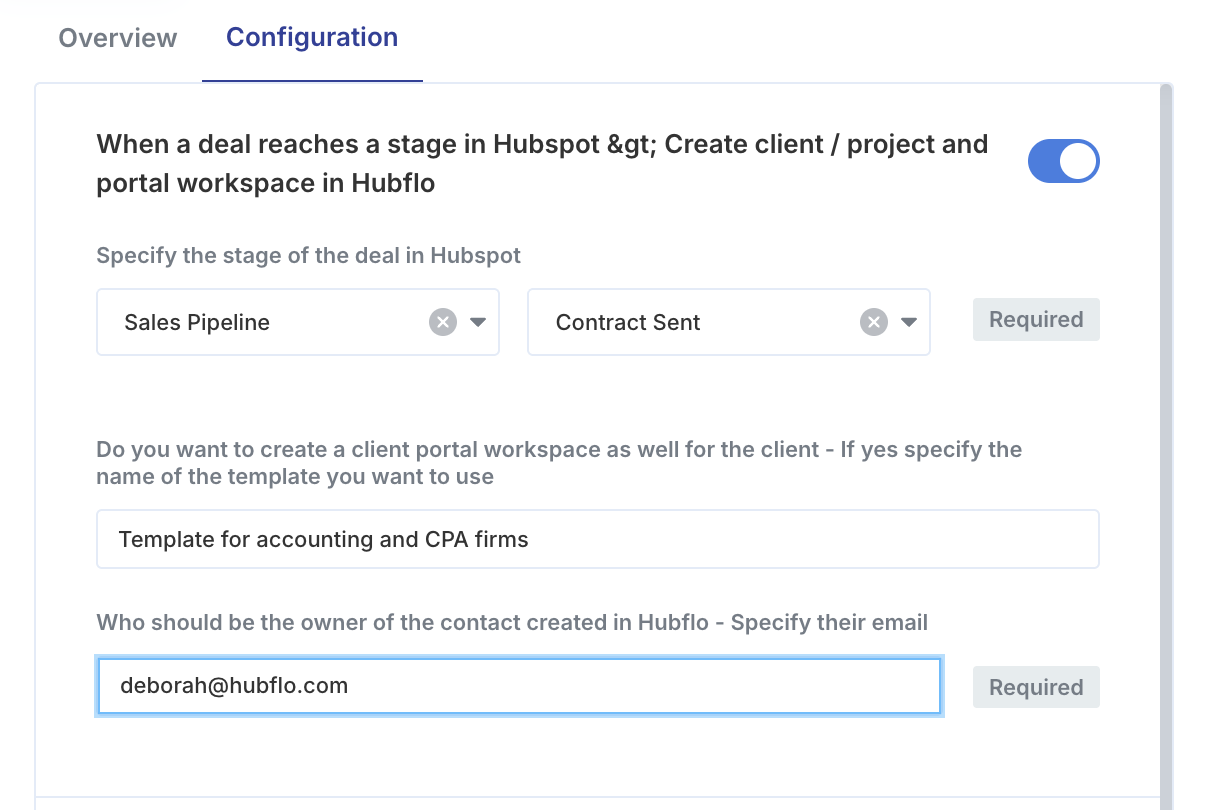
Specify which pipeline and deal stage in HubSpot should trigger the automation.
Choose a portal workspace (Optional). You can find your template names under Settings > Workspace Templates.
Specify the email of the internal Hubflo user who should be assigned as the owner of the contact created in Hubflo. They'll be set as the contact's owner in your Directory.
Not sure which workspace template to use, or how to set one up? See Create workspace templates.